
Which eCommerce Platform Is Best for SEO?

If you are asking which eCommerce platform is best for SEO, WooCommerce is usually the strongest overall choice for control, flexibility and long-term content growth. However, it is not automatically the right platform for every online shop.
Shopify, Wix, Squarespace and BigCommerce can all support search visibility. The better choice depends on your catalogue, how often you update products, the support available to you and how much control you need over content and technical settings.
Platform choice is only one part of improving an online store’s visibility. My SEO guide for business owners explains the wider foundations, including keyword research, on-page SEO, technical checks, content and measurement.
Key Takeaways
WooCommerce offers the greatest overall control over content, categories, URLs and technical setup.
Shopify handles many technical basics and is often easier for a small team to manage.
Wix and Squarespace can suit smaller stores with straightforward catalogues.
BigCommerce provides strong built-in tools for larger or more complex product ranges.
Every platform still needs clear products, useful categories, internal links and ongoing maintenance.
Which eCommerce Platform Is Best for SEO?
The Direct Answer
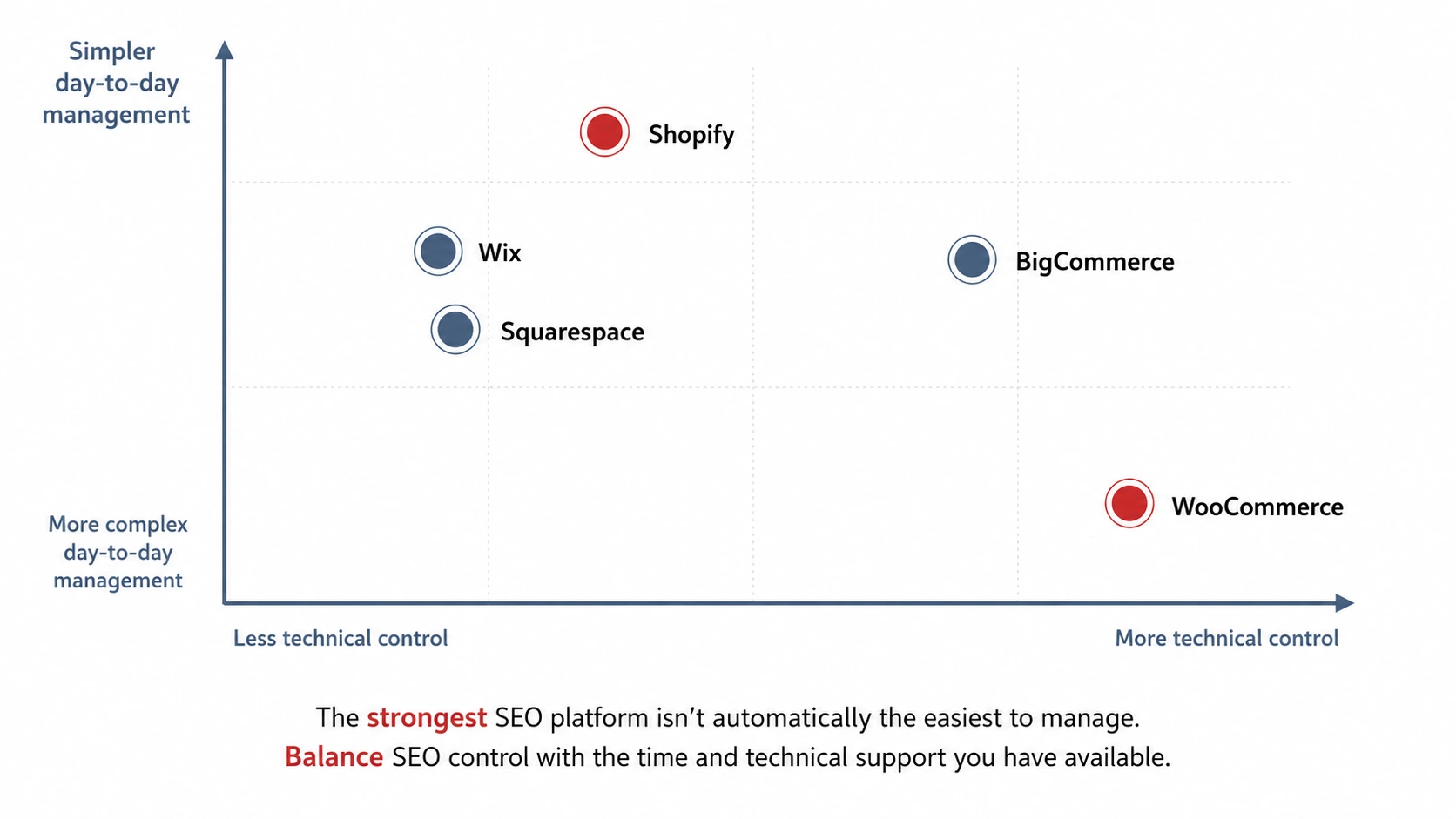
For most small businesses that want room to improve and expand their search strategy, WooCommerce is the best overall option. It combines the content controls of WordPress with the product, category and checkout tools needed for an online store.
The answer to which ecommerce platform is best for seo still depends on what your business can manage. WooCommerce gives you more freedom, but you are also responsible for hosting, updates, plugins, security and technical support.
Shopify is often easier when you want a hosted platform with fewer maintenance decisions. BigCommerce may suit a larger catalogue. Wix and Squarespace can work well for a smaller store that values a simple editing experience over deeper control.
Why There Is No Universal Winner
A platform does not rank a store by itself. Search visibility depends on how well the website is planned, written, organised and maintained.
A flexible platform can still perform poorly when product descriptions are copied, categories are unclear or important pages are difficult to reach. A simpler platform can perform well when its content and structure answer what customers are searching for.
What Is eCommerce SEO and What Should a Platform Let You Control?
What is ecommerce SEO in practical terms? It is the work that helps search engines understand an online store and helps the right customers find its products, categories and supporting content.
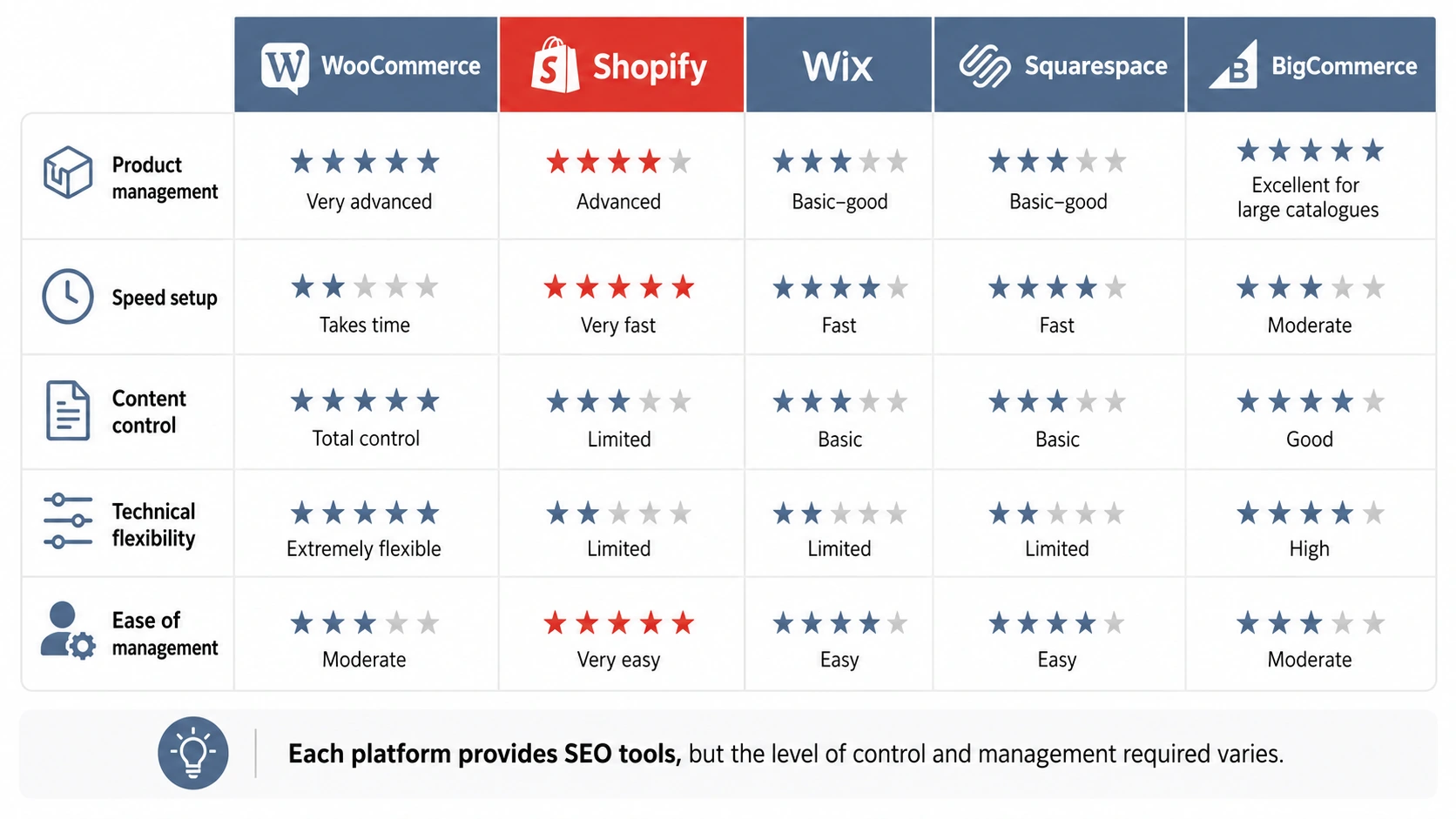
A suitable platform should give you enough control over product management, speed, content and technical settings.
Product Management
You need to create clear product titles, descriptions, images, prices, stock information and variations. For a clothing shop, one product may have several sizes and colours.
The system should make those options clear to customers without creating dozens of near-identical pages. It should also remain manageable when products sell out, return or move into a new range.
Site Speed
Platform choice affects speed, but so do themes, apps, plugins, hosting, image sizes and third-party scripts.
A hosted platform may handle more of the technical setup. WooCommerce gives you more freedom to choose hosting and make detailed changes, but poor hosting or an overloaded plugin setup can still slow the store down.
Content Control
Product pages are only one part of a growing shop. You may also need category introductions, buying guides, size information, delivery details, returns content and blog articles. Whichever platform you choose, each listing still needs useful content and clear search signals. Our guide to optimising online store product pages explains what those pages should include.
WooCommerce is strong here because WordPress lets you build a wider content structure around the shop rather than treating every visit as a direct route to a product page.
Technical Flexibility
Technical control includes URLs, redirects, canonical settings, structured data, indexing rules and template changes.
You may not edit these settings yourself, but your developer or SEO specialist should be able to correct problems without unnecessary platform restrictions.
How to Structure an eCommerce Site for SEO
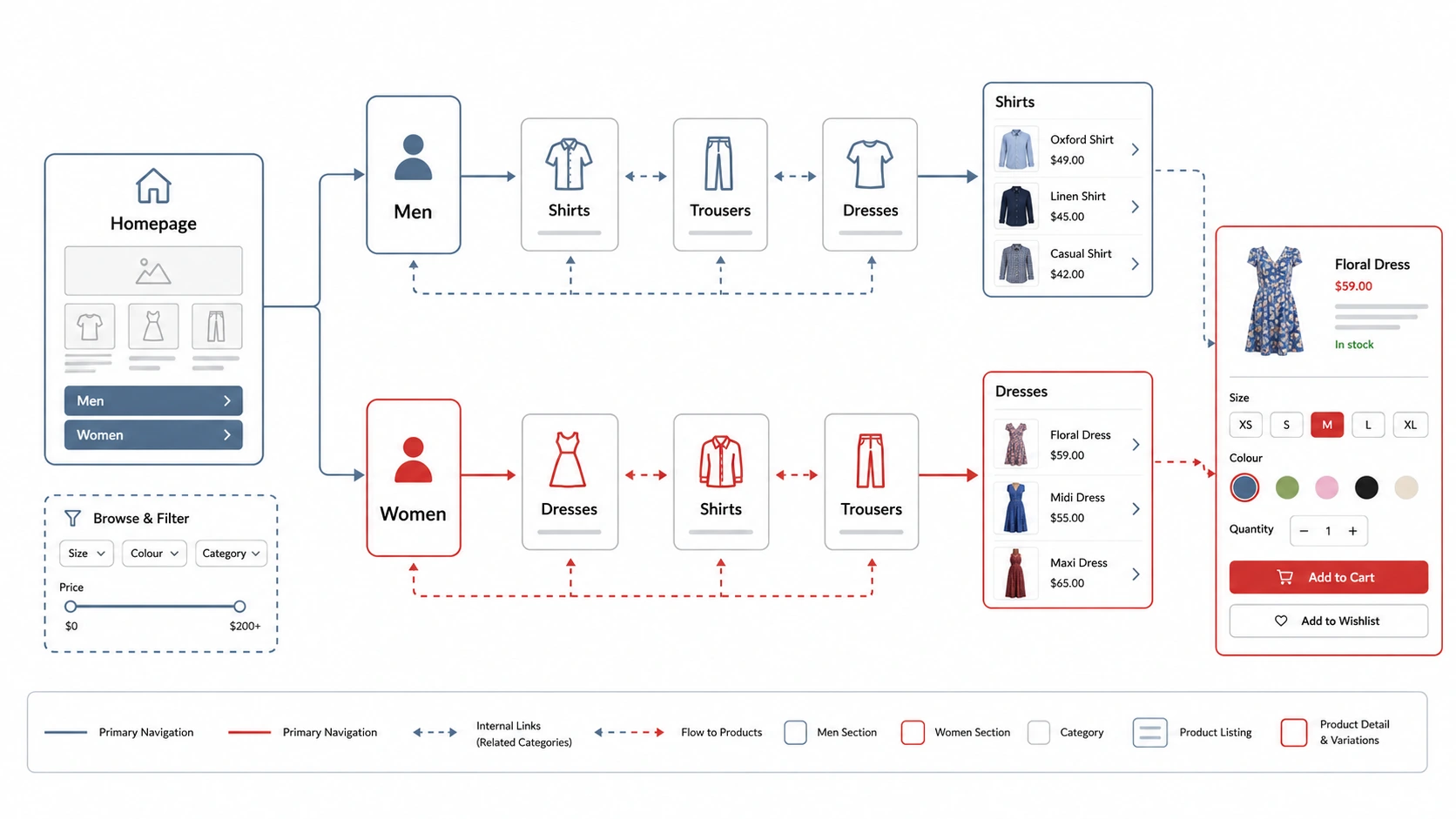
A clear structure usually moves from the homepage to main categories, then subcategories where needed, followed by individual products.
For a clothing store, that could mean separate routes for men and women, followed by dresses, shirts, skirts and trousers. Filters such as size and colour should help shoppers narrow the choice without replacing the main category structure. Our guide to improving online store category pages explains how to make those core pages clearer for customers and search engines.
My eCommerce SEO checklist covers the wider checks behind this setup. The guide to building an online store also explains the planning decisions that come before individual SEO settings.
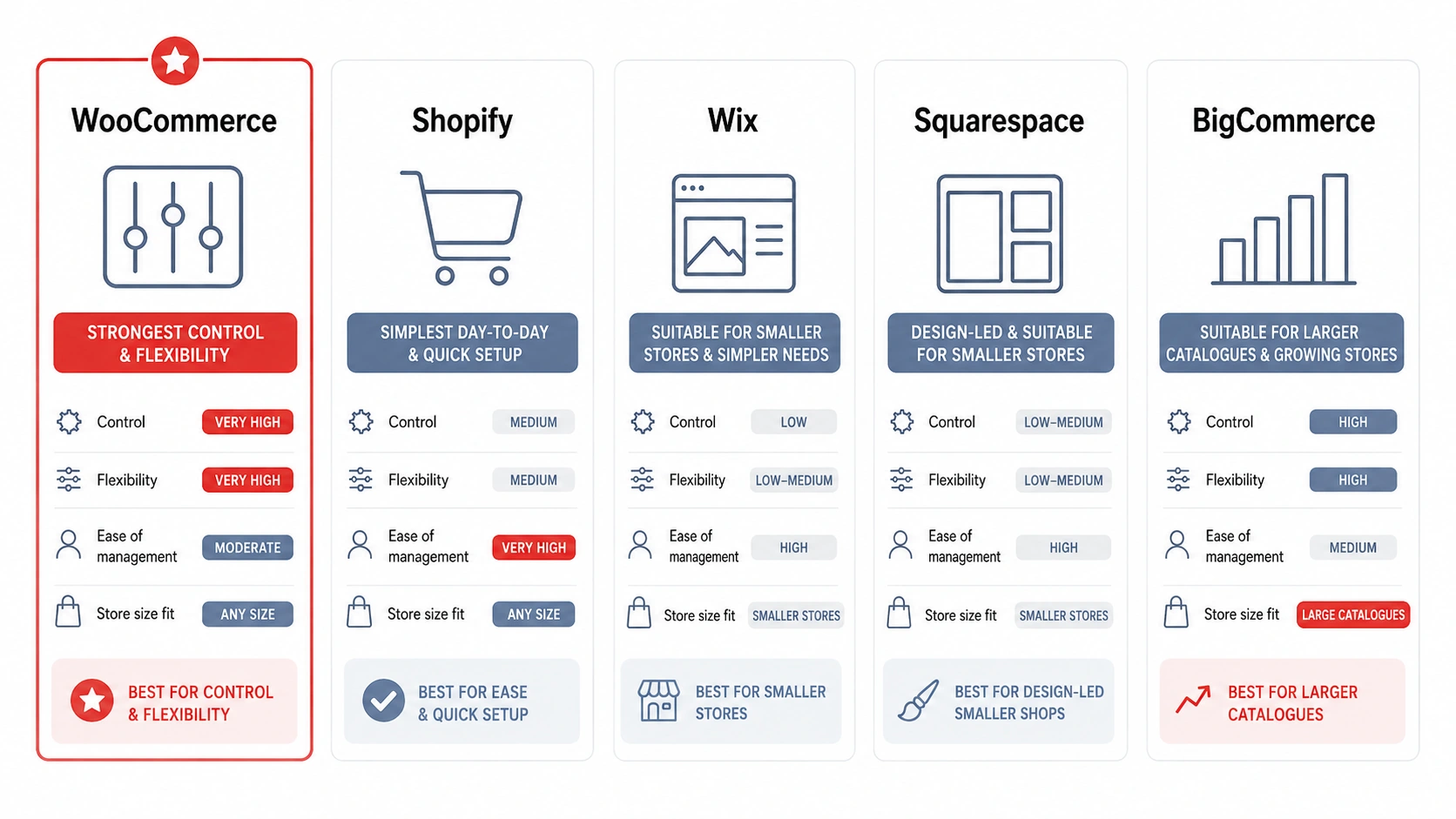
eCommerce SEO Platform Comparison at a Glance
| Platform | Best suited to | Main SEO strength | Main trade-off |
|---|---|---|---|
| WooCommerce | Businesses wanting control and content flexibility | Detailed control over products, categories, content and technical setup | Needs hosting, maintenance and technical support |
| Shopify | Small teams wanting a managed platform | Many technical basics are handled within the platform | Some parts of the structure offer less freedom |
| Wix | Smaller stores with straightforward requirements | Accessible page and product SEO controls | Less suitable for highly customised structures |
| Squarespace | Small, image-led shops | Simple tools within a visual website system | Limited depth for larger catalogues |
| BigCommerce | Growing stores with broader catalogues | Strong native ecommerce and technical controls | Can be more platform than a small shop needs |
Why WooCommerce Offers the Most SEO Control
WooCommerce sits within WordPress, so products can connect naturally with categories, guides, blog content and internal links. A developer also has more freedom to shape templates, URLs and technical settings around the business.
For someone comparing which ecommerce platform is best for seo, this wider control is the main reason WooCommerce comes out ahead.
WordPress Gives You More Content and URL Control
WordPress supports flexible page structures, editable content and custom permalink settings. WooCommerce adds the store functions, while themes, builders and carefully chosen plugins can shape product and category pages.
This does not mean adding a plugin for every small feature. A clean setup is usually easier to maintain. The benefit is having a choice of tools rather than one fixed system.
For a wider CMS comparison, my WordPress vs Umbraco guide explains why platform choice should reflect who will manage the website and how much custom development it needs.
Products, Categories and Variations Can Be Organised Carefully
WooCommerce supports hierarchical categories, reusable attributes and variable products. A clothing store can use parent and child categories, then manage size and colour as variations instead of creating a separate page for every combination.
WooCommerce’s documentation explains how categories and attributes organise a catalogue, while its variable-product guidance covers separate prices, stock and images for individual variations.
That control still needs planning. Too many weak categories or unnecessary filters can make the website harder to browse and maintain.
Greater Control Comes With More Responsibility
WooCommerce needs suitable hosting, backups, security, software updates and checks after changes. A business also needs to decide who will deal with technical problems.
For some owners, that responsibility is worthwhile because the website can be adapted more freely. For others, a managed platform may reduce day-to-day pressure.
When Shopify Is the Better Fit
Shopify is a strong choice when you want to sell online without managing hosting, WordPress updates or a collection of plugins.
Many Technical Basics Are Handled for You
Shopify automatically creates canonical tags, sitemap and robots files, and enables SSL certificates by default. You can also edit titles, descriptions, URLs and image alt text across key page types.
Shopify’s SEO overview explains which elements are handled automatically and which can be edited.
Easier Management, With Less Freedom
A smaller team may value having hosting, security and core store functions within one service. The admin area is built around products, orders and routine store tasks.
The trade-off is less freedom when you need an unusual URL structure, complex filtering or a heavily customised content setup. Shopify stores can rank well, but deeper changes may require specialist development or workarounds.
How Wix and Squarespace Compare
Wix and Squarespace combine hosting, visual editing and ecommerce tools in one subscription. That can suit a small business that wants to manage its own pages without a separate hosting setup.
Wix
Wix provides controls for product titles, descriptions, URL slugs, canonical settings, indexing and structured data. Product URL structures can also be changed, with redirects available when those structures are updated.
For a small catalogue, this may be enough. The limits become more noticeable when a store needs complex templates, unusual page types or detailed technical changes.
Squarespace
Squarespace suits smaller, image-led stores that want a polished visual system and a manageable catalogue. Its built-in tools cover page information, URL slugs, SSL and basic product organisation.
Wix, Squarespace and BigCommerce all provide useful SEO foundations, although their depth differs. BigCommerce adds custom URLs, redirects, product rich-result data and robots.txt editing, while Wix and Squarespace focus more heavily on accessible built-in controls.
Where BigCommerce Fits
BigCommerce is a hosted ecommerce platform that often suits stores with broader catalogues and more advanced selling requirements.
Strong Built-In Technical Controls
BigCommerce includes editable URLs, redirects, product data for richer search listings and robots.txt access. Its hosted setup also removes the need to manage a separate WordPress installation and hosting environment.
Better Suited to More Complex Stores
A business with a large catalogue, several sales channels or more demanding product management may find BigCommerce a good fit.
For a first store with a small range, it may provide more features than the business needs. When deciding which ecommerce platform is best for seo, BigCommerce deserves consideration where catalogue scale and built-in tools matter more than WordPress content flexibility.
What Clothing Stores Should Check Before Choosing a Platform
Clothing stores have particular requirements because one product may have several sizes, colours and stock levels. New ranges arrive, older items sell out, and photography has a major influence on the buying experience.
Sizes, Colours and Variations
The platform should let you manage product options without duplicating work. Test how easy it is to add a product, create variations, update stock and change the main product information.
Categories and Filters
Main categories should reflect how customers browse. A store may use men and women as top-level routes, followed by shirts, trousers, dresses and skirts.
Filters can narrow the range by size, colour or style, but they should support the main categories rather than create thousands of weak pages.
Images and Speed
Several large images on every product page can slow the store, especially on mobile connections. The platform should support sensible image sizes and modern formats, but the person uploading products also needs a clear process.
Day-to-Day Updates
Think about who will add new ranges, change prices, manage stock and create promotions. A powerful system is only useful when the team can manage routine work confidently.
For a clothing business asking which ecommerce platform is best for seo, the strongest choice usually combines clear variation management with enough content and technical control for future growth.
Urban Attire Case Study: Choosing WooCommerce for a Clothing Store
Urban Attire is a Bristol clothing business selling distinctive clothing for men and women. The project shows why platform choice needs to support both the customer experience and routine store management.
The Problem
The business needed an online store that reflected its bold visual identity while remaining straightforward to use. It also required secure payments, customer accounts and a backend where products and promotions could be updated without rebuilding pages.
The store needed a clear foundation for ongoing SEO, including sensible navigation, categories, mobile layouts and room for future content.
The Method
I built the website with WordPress, WooCommerce and Bricks Builder. WooCommerce handled the products and checkout, while WordPress provided control over page content and store structure.
The live Urban Attire website uses clear routes for men, women and the wider shop. Customers can move from collections to products, create an account, use the basket and complete checkout. The client can also manage products and promotions through the backend.
The Successful Results
The finished website gave Urban Attire a secure and manageable store that reflected the brand more clearly. Product routes, customer accounts and payments were brought together within one consistent system.
The project also established the foundations for future SEO work without making unsupported promises about rankings or sales. Most importantly, the client gained a store they could update as products and promotions changed.
How to Choose the Right eCommerce Platform for Your Business
Start with your own requirements rather than a generic platform ranking.
How Large Will the Catalogue Become?
A shop with twenty simple products has different needs from a clothing store with hundreds of items, seasonal ranges and several variations per product. Estimate how often products will change and how much the catalogue may grow.
How Much Content Will You Publish?
Some stores rely mainly on products and categories. Others need buying guides, advice articles, brand stories and campaign pages. WooCommerce is particularly useful when content will become a major part of the search strategy.
Who Will Handle Maintenance?
WooCommerce needs someone to manage hosting, updates, backups and technical checks. Hosted platforms reduce some of this work, although apps, templates and integrations still need attention.
How Much Custom Control Will You Need?
Consider whether the store may need custom filters, unusual checkout functions, specialist content types or integrations.
Choosing only for current needs can lead to an expensive platform change later, while an advanced setup can create unnecessary work for a very simple store.
When WooCommerce Is Likely to Be the Best Choice
WooCommerce is usually strongest when SEO control, flexible content and a tailored store structure matter, especially when reliable development and maintenance support are available.
Shopify may be better when simplicity and managed hosting come first. Wix or Squarespace may suit a smaller visual catalogue. BigCommerce may be more appropriate for a growing store with complex ecommerce requirements.
For eCommerce website design in Bristol, I focus on matching the platform and store structure to how the business sells rather than forcing every shop into the same setup.
Final Thoughts
WooCommerce offers the strongest overall balance of SEO control, content flexibility and custom store structure, but it also asks more of the business in hosting, maintenance and technical support. Shopify, Wix, Squarespace and BigCommerce can all be sensible choices when their strengths match the catalogue and the way the store will be managed.
When deciding which ecommerce platform is best for seo, look beyond the platform name. Choose the system that gives you enough control to organise products, publish useful content and improve the site over time without making routine management unnecessarily difficult.


FAQs
01
Is WooCommerce Better Than Shopify for SEO?
WooCommerce usually offers more control over content, URLs, templates and technical settings. Shopify handles more of the technical setup, which can make it easier to manage. The better choice depends on whether your business values maximum flexibility or a more managed system.
02
Can a Shopify Store Rank Well on Google?
Yes. Shopify includes the main foundations needed for search visibility, including editable titles, descriptions, URLs and image alt text. Rankings still depend on the store structure, product content, categories, internal links and wider authority.
03
Is Wix or Squarespace Good for eCommerce SEO?
Both can work well for smaller stores with straightforward catalogues. They include the main controls needed to edit page information and organise content. A larger or more customised store may need more flexibility.
04
Is BigCommerce Suitable for a Small Business?
It can be, particularly when the business expects its catalogue or selling requirements to become more complex. A very small shop should compare the cost and features with simpler options to avoid paying for tools it does not need.
05
Can Changing eCommerce Platforms Damage SEO?
Yes. A poorly planned migration can affect URLs, redirects, metadata, internal links and indexation. The risk can be reduced by mapping old pages to new ones, preserving useful content, testing redirects and checking the site before and after launch.
Author Bio

Fred Morpeth
Table of Contents