
SEO for Product Pages in an Online Store
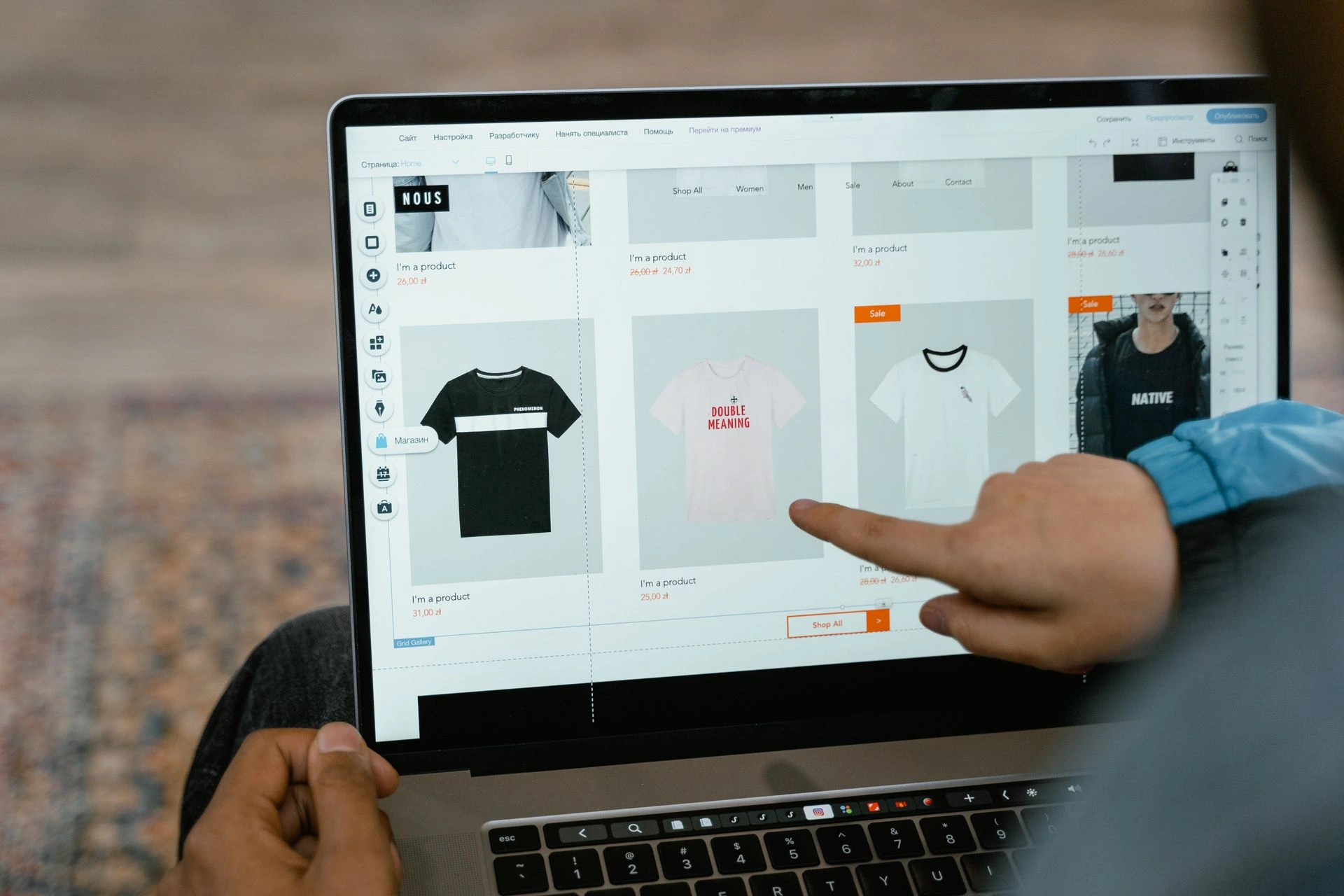
SEO for product pages means making each product clear, useful and easy for both shoppers and search engines to understand. A page needs to describe the item accurately, answer the questions that affect a buying decision and connect naturally with the wider online store.
Keywords are part of that process, but they are not the whole job. A product page can include the right phrase and still struggle if the copy is copied from a supplier, the images are slow, the sizes are confusing or customers cannot find delivery information.
My SEO guide for business owners explains the wider foundations behind search visibility, including keyword research, content, on-page SEO, technical checks and measurement. This article focuses specifically on applying those principles to individual ecommerce product pages.
Key Takeaways
Product titles should describe the item clearly without becoming overloaded with keywords.
Original product copy should answer practical questions about fit, materials, features and suitability.
Images need to be useful, accurately described and kept at a manageable file size.
Prices, stock, variations, delivery details and returns information should be easy to find.
Structured data and internal links help search engines understand each product and its place within the store.
Out-of-stock and discontinued products need different handling depending on whether they will return.
What Makes a Product Page Useful?
A product page has two closely connected jobs. It needs to help the right person discover the product, then provide enough information for them to decide whether it is suitable.
Good SEO for product pages supports both aims. The page should explain what the item is, who it is for and what makes it different from similar options. It should also make basic details such as price, stock, sizes and delivery expectations easy to find.
Think about how you shop online. You may arrive with a specific product in mind, but you still want to check the details before buying. For clothing, that could include the material, fit, available sizes, colour options and returns policy.
The strongest SEO product pages do not make visitors search around the website for this information. They bring the main details together in a clear format and provide links when a longer explanation is needed.
How SEO for Product Pages Works
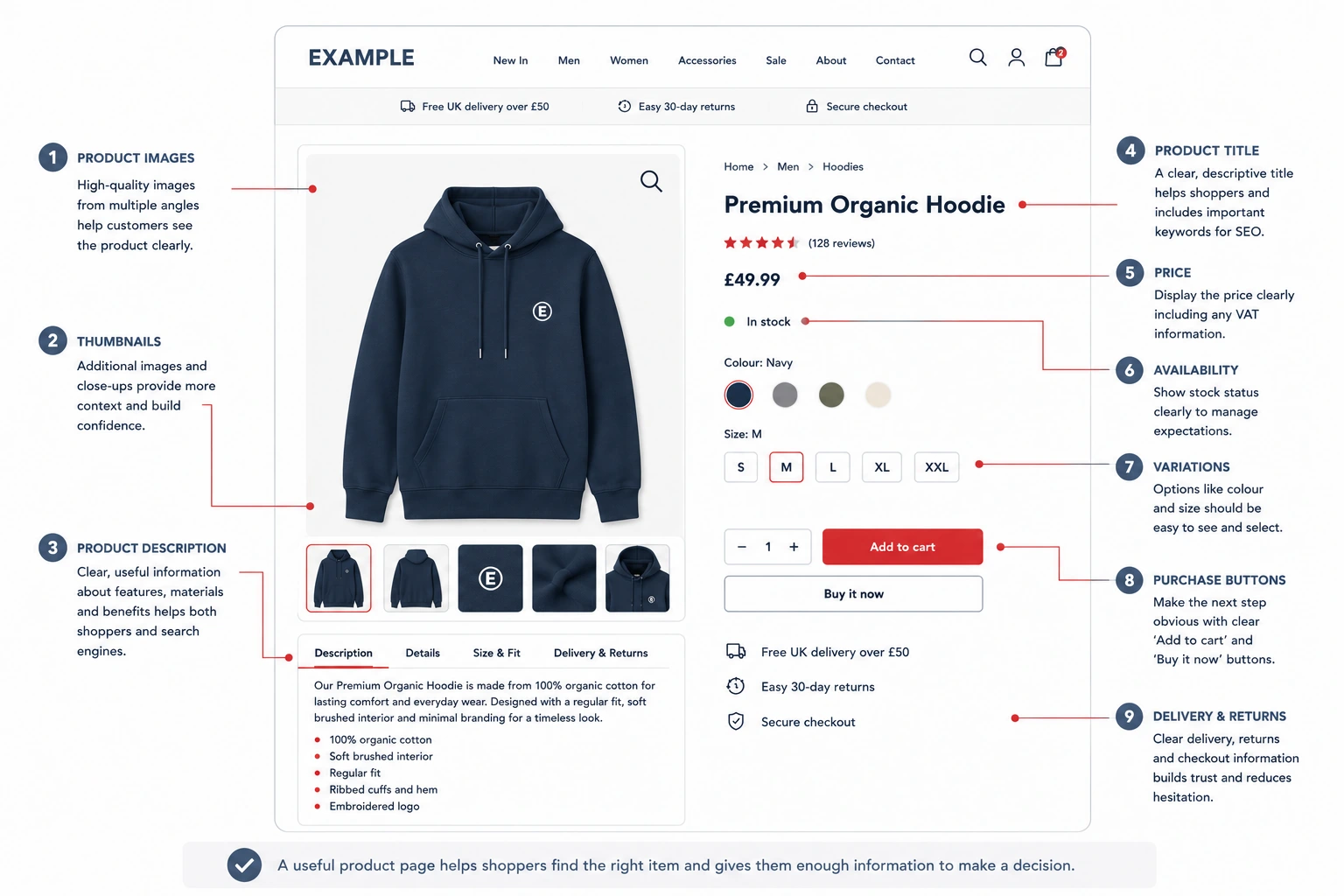
Good SEO for ecommerce product pages starts with making sure every visible and technical element describes the same item clearly. Search engines use the title, product copy, images, structured information and internal links to understand what the page offers and when it may be relevant.
Those elements should support the same topic rather than sending mixed signals. The product title, description, variations, price and availability should all remain accurate and consistent.
For a wider review of categories, store structure, technical checks and content, use my eCommerce SEO checklist for online stores.
Write a Clear Product Title
The product title should identify the item in plain language. It may include the product type, brand, style, material or audience when those details genuinely help someone understand what is being sold.
A title such as “Women’s Oversized Cotton Graphic T-Shirt” is more useful than a vague internal product name such as “Urban Collection 04”. It tells shoppers and search engines what the item is before they read the full description.
Avoid packing every possible variation into the title. Sizes, colours and minor specifications can usually sit within the product options or supporting information.
The title should also match how the product is described elsewhere. A product called a jacket in the title should not be labelled as a coat throughout the description and category structure unless both terms are genuinely relevant.
Create Original Product Copy
Supplier descriptions are often reused across many shops. Copying them gives your page little that is specific to your store, your customers or the way you present the product.
Original copy allows you to explain the item more clearly. For a clothing product, that could include the fit, feel, fastening, material, styling options and situations where the item may work well.
The description does not need to become an essay. Its length should reflect how much information a customer needs. A simple accessory may need less explanation than a fitted jacket with several materials and care requirements.
Start with the points that affect the decision. Describe the product naturally, then add supporting details without repeating the same information several times.
Put Important Information Where Customers Can Find It
Price, stock, sizes, colours and the purchase button should sit where customers can find them quickly.
Delivery and returns information should also be accessible from the product page. This does not mean placing your entire policy beside every item. A short explanation with a clear link is usually enough.
Product pages SEO work is weakened when information exists somewhere on the site but is difficult to reach. Customers should not need to open several unrelated pages to confirm whether an item is available in their size or can be returned.
Clear information reduces uncertainty and makes the page easier to use on both desktop and mobile devices.
Product Images, Alt Text and Page Speed
Product images often carry much of the selling work. Customers cannot pick up the item, so the photography needs to help them understand its appearance, shape, texture and details.
Use Images That Answer Product Questions
A clothing product may benefit from front and back views, close-ups of materials or patterns and images showing how the item fits.
Every image should have a reason to be there. Several nearly identical photographs can make the page heavier without helping the customer.
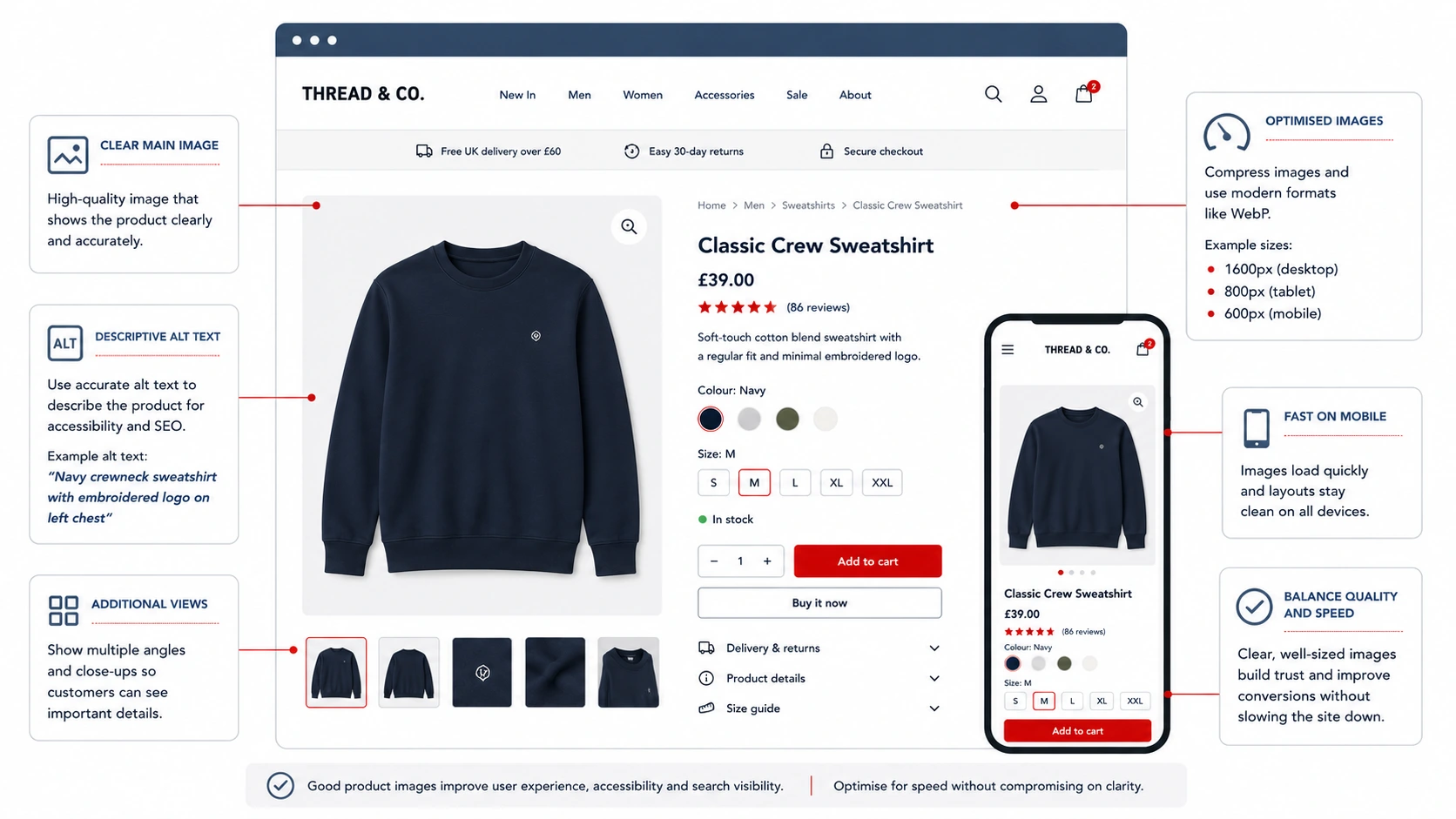
The main image should present the product clearly, while additional images can answer specific questions. A close-up may show fabric texture, stitching or a fastening that is difficult to see in the wider shot.
Write Useful Image Details
Image filenames and alternative text should describe the image accurately.
Alternative text, often shortened to alt text, helps explain an image when it cannot be seen. It also supports people using screen-reading software.
Write what is visible rather than inserting a long list of keywords. “Women’s black patterned midi dress viewed from the front” is clearer than “best women’s fashion clothing dress UK”.
Not every decorative image needs a detailed description, but product images should usually provide useful context.
Keep Image Files Manageable
High-quality photography does not need to mean uploading the largest file produced by the camera.
Images should be resized for the website, compressed sensibly and served in a suitable format. The goal is to retain enough detail without forcing customers to download files far larger than the screen can display.
This is especially relevant for mobile visitors. A product page with several oversized images can feel slow even when the rest of the website is well built.
Check product templates regularly because apps, review tools, tracking scripts and added features can also increase the amount of work the page needs to load.
Product Information, Variations and Structured Data
Detailed product information helps customers compare options and gives search engines clearer context about the item.
The exact fields will vary between industries, but they should match the questions people usually ask before buying.
Include Complete Product Information
Common product details include:
| Product information | What it helps explain |
|---|---|
| Price | What the customer will pay |
| Availability | Whether the item can currently be ordered |
| SKU | How the product is identified internally |
| Brand | Who produced or supplies the item |
| Materials | What the product is made from |
| Dimensions or fit | How large the item is or how it is expected to fit |
| Variations | Which sizes, colours or styles are available |
| Care details | How the product should be cleaned or maintained |
Not every detail needs to appear in the opening paragraph. Tables, tabs and clearly labelled sections can keep longer information manageable.
The visible information should remain consistent throughout the page. A stock message, price or variation shown in one part of the template should not conflict with the basket or checkout.
Handle Sizes and Colours Carefully
For clothing retailers, SEO for product pages often involves several versions of the same item.
A shirt may be available in multiple sizes and colours, but it is still one core product. Creating a separate weak page for every combination can lead to repeated information and a catalogue that is difficult to maintain.
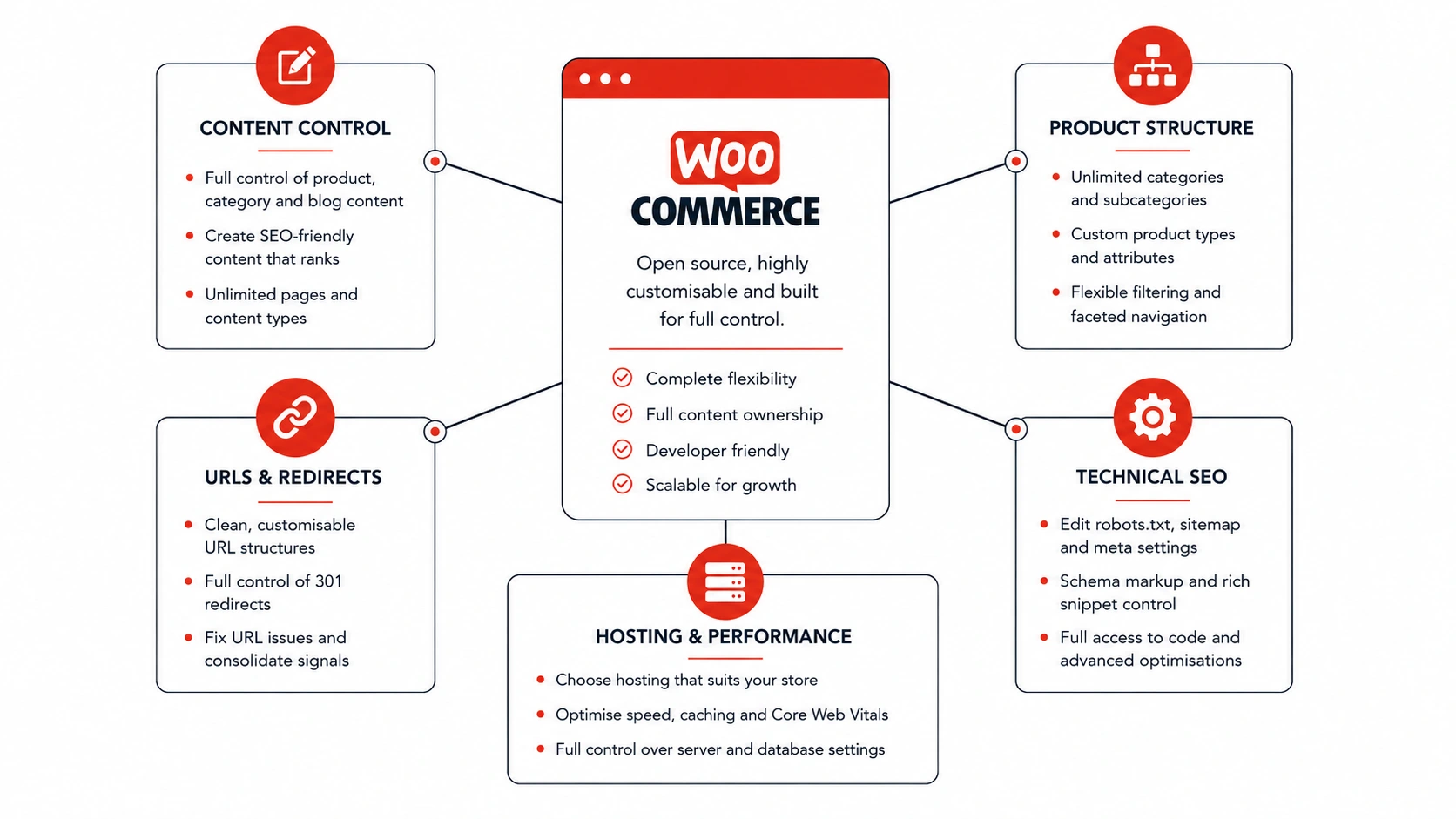
WooCommerce variable products allow separate variations to hold details such as stock, price and images while remaining part of a parent product. This makes them useful for clothing, footwear and other products with selectable options. WooCommerce’s variable product guidance explains how these options can be managed.
The page should make unavailable combinations clear. Customers should not need to select several options before discovering that the combination cannot be ordered.
Add Product Structured Data
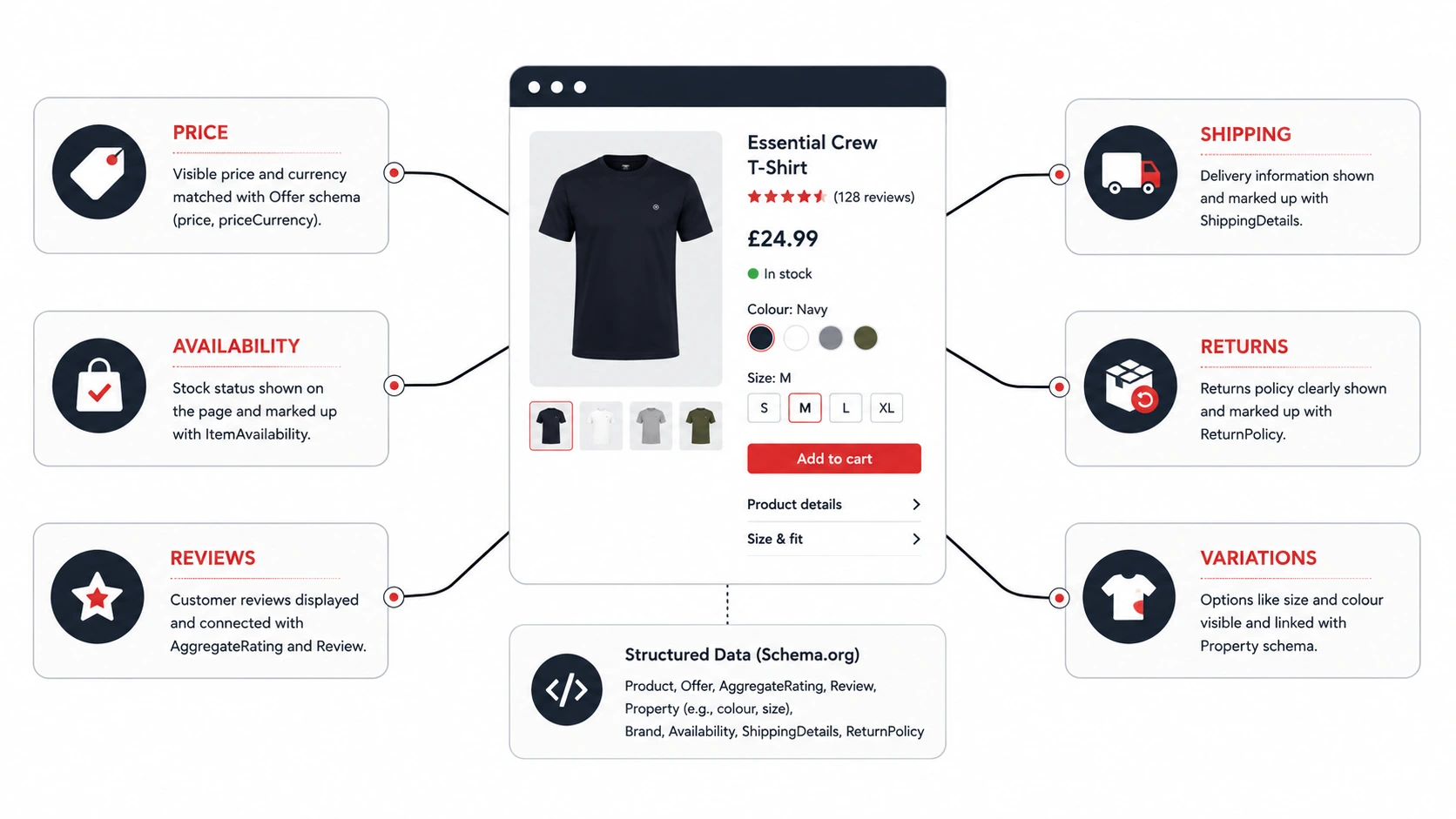
Structured data is information added to the page code in a standard format. It helps search engines identify details that are already visible to customers.
For product pages, this may include:
| Structured product detail | Example |
|---|---|
| Product name | Oversized cotton graphic T-shirt |
| Price | £24.99 |
| Availability | In stock |
| Rating | 4.6 from verified reviews |
| Shipping | UK delivery information |
| Returns | The store’s return conditions |
| Variations | Available colours and sizes |
Google’s product structured data guidance explains that valid product information may be used for richer search appearances containing details such as price, availability, ratings, shipping and returns. It can also help Google understand product variations, although it does not guarantee that an enhanced result will appear.
The structured information should match the visible page. If the page says that a product is out of stock while the structured data says it is available, the signals are inconsistent.
Many ecommerce systems and SEO plugins produce product schema automatically. That output still needs checking, particularly after changes to templates, plugins or product feeds.
Reviews, Delivery Details and Customer Confidence
Product pages are not only information sheets. They also need to answer the concerns that can prevent someone from completing a purchase.
Product Reviews
Genuine reviews can add details that the main description may not cover. Clothing reviews often discuss fit, fabric, colour accuracy and how the item feels when worn.
Reviews should come from real customers and should be moderated properly. Do not add false reviews or copy reviews from other websites.
A review feature also needs a plan for managing spam and responding when a customer raises a genuine problem.
Reviews do not replace good product copy. They support it by adding customer experiences and questions that may help future buyers.
Delivery and Returns
Customers want to know how much delivery costs, when the item is likely to arrive and what happens if it is unsuitable.
Provide the main information near the buying area, then link to the full policy where necessary. For clothing stores, a clear returns route can matter because customers cannot try the item on before ordering.
Avoid vague phrases such as “fast shipping” when you can give a clearer estimate. An expected delivery range is usually more useful.
Delivery promises should match the checkout. Showing one price on the product page and another at checkout can reduce confidence.
Trust Information
Useful trust information may include secure payment methods, contact details, stock status and links to clear policies.
The goal is not to cover the page with badges. Too many icons and claims can distract from the product itself.
Focus on the questions a genuine customer may have. Can they contact the business? Can they understand the returns process? Does the checkout use secure payment? Is the price clear?
Straightforward answers usually do more than a large collection of generic reassurance graphics.
Internal Links and Related Products
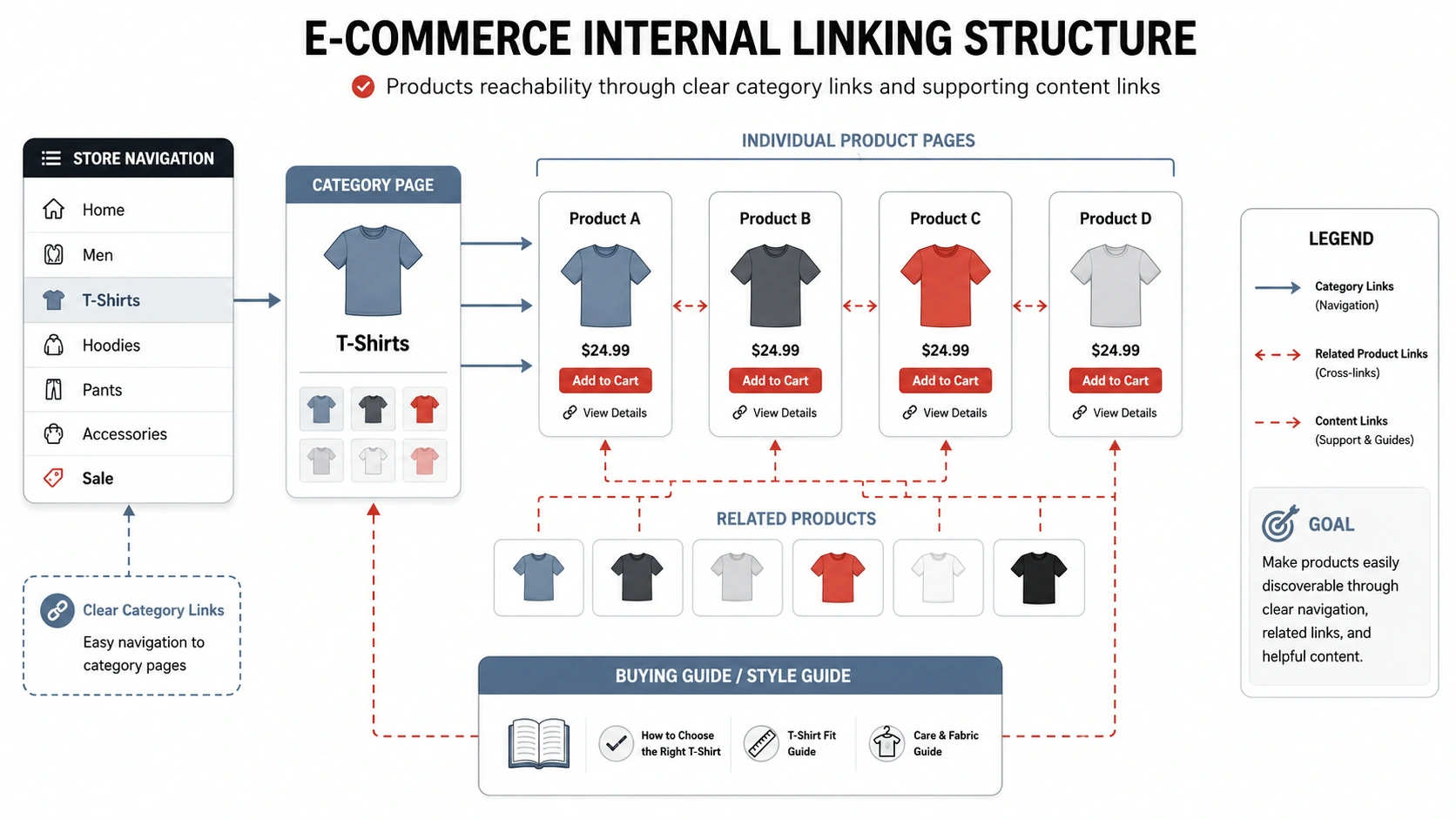
A product page should not sit alone. It needs clear connections to categories, related products and supporting content.
Link Products to Their Main Categories
Customers should be able to move from a category to its products and back again without relying on the internal search box.
For example, a women’s dress may sit under Women, then Dresses. Breadcrumbs and category links can show that relationship and help visitors continue browsing. To strengthen the pages sitting above individual products, read our guide to optimising eCommerce category pages for search.
Google’s guidance on ecommerce site structure recommends linking from categories to subcategories and then to products, because Google uses those page connections to understand the store and discover its content.
SEO for product pages becomes much harder when important products can only be found through filters or search forms. Products you want indexed should have normal links from relevant parts of the store.
Use Related Products Carefully
Related products can help customers compare options or find an alternative.
The connection should make sense. A similar shirt in another colour may be useful. A random product added solely to increase the number of links is less helpful.
You can also link complementary products where the relationship is clear, such as a jacket that works with the trousers being viewed.
Keep the number manageable. A long grid of unrelated recommendations can distract from the product and make the page slower.
Link From Supporting Content
Buying guides, articles and collection pages can link to products when the product is relevant to the topic.
A guide about styling bold patterns could link to suitable patterned clothing. A size guide could link back to the product ranges where those measurements apply.
The wider guide to building an online store explains how product organisation fits into the planning process. My comparison of which eCommerce platform is best for SEO also looks at how platform choice affects content and technical control.
These links should help the reader continue naturally. They should not be inserted into sentences that have no real connection with the destination page.
What to Do With Out-of-Stock and Discontinued Products
Stock changes are normal for an online shop, but removing pages without a plan can leave broken links and create a frustrating experience.
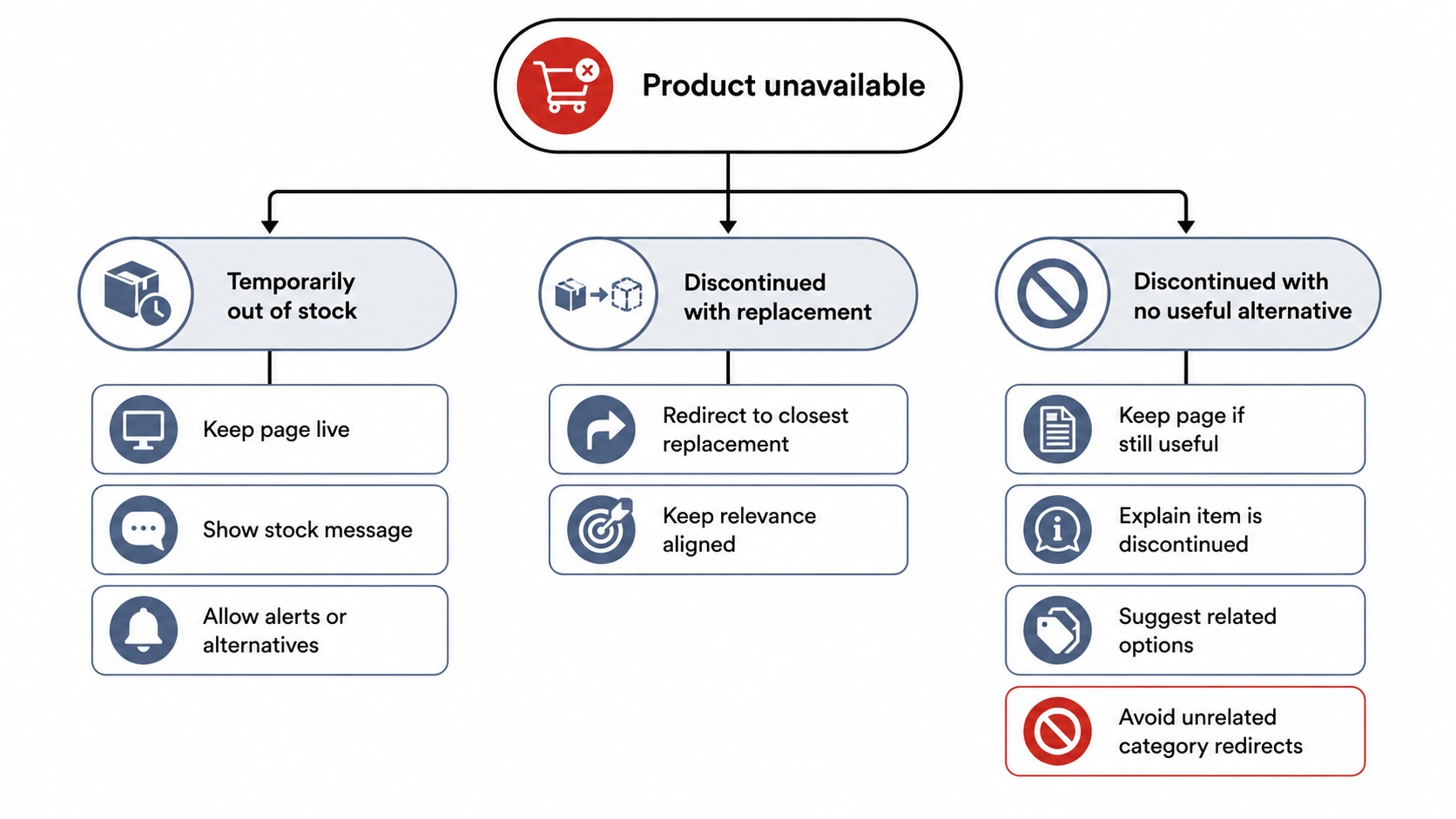
The right action depends on whether the product is returning and whether there is a genuine replacement.
Temporarily Out-of-Stock Products
A temporarily unavailable product page can often remain live.
Update the stock status clearly and remove or disable the purchase option. Where possible, offer a restock notification or link to close alternatives.
The title and description can remain because the product has not permanently disappeared. Make sure the structured availability information is updated as well.
Google advises businesses not to remove temporarily unavailable products from Search unnecessarily. Its guidance for pausing online business activity recommends keeping product pages available and marking items as out of stock when the situation is temporary.
A sensible SEO for product pages process should also check where the unavailable item is linked. You may want to remove it from prominent homepage sections while keeping the page accessible through its category.
Permanently Discontinued Products
A discontinued page needs a more permanent decision.
Where a close replacement exists and serves the same need, a redirect may make sense. The replacement should be genuinely relevant rather than simply another item from the same broad category.
A useful discontinued page may remain available when it has earned links, contains valuable information or helps customers understand the old product. It can explain that the item is no longer sold and direct visitors to suitable alternatives.
When the page has no remaining value and no relevant replacement, removing it may be appropriate. The website should then return the correct status rather than sending every old product to the homepage.
Avoid automatic rules that treat every discontinued item in the same way. A temporary stock issue, seasonal product and permanently retired item require different handling.
Urban Attire Product Pages in Practice
Urban Attire is a Bristol clothing business selling bold clothing for men and women.
The project needed an ecommerce setup that could handle product updates, clothing variations, payments and customer accounts while supporting future SEO work.
The Problem
Urban Attire needed more than a visual brochure. Customers had to be able to browse products, select suitable options, pay securely and manage an account.
The business also needed a backend that made routine product and promotion changes manageable. A store that depends on a developer for every stock or price update quickly becomes difficult to run.
The product setup therefore had to support both the customer-facing experience and the work happening behind the scenes.
The Method
I built the website using WordPress, WooCommerce and Bricks Builder.
WooCommerce provided the product and checkout system, while WordPress and Bricks gave me control over the page content and wider design. The store was organised with clear routes for the main shop, men’s clothing and women’s clothing.
The live Urban Attire store includes product listings, pricing options, customer accounts, a basket and checkout. The client can manage products and promotions through the website backend.
This is where SEO for product pages connects with development. Titles, descriptions and image details need a template that presents them clearly, while stock, pricing and variations need to function consistently throughout the buying process.
The Successful Results
Urban Attire gained a secure, manageable ecommerce website that reflects its brand and provides clear shopping routes.
Products, customer accounts, payments and content updates were brought together within one system. The project also established an SEO-ready foundation without making unsupported promises about traffic, rankings or sales.
Most importantly, the website can be updated as products and promotions change. That matters for a clothing store where ranges, stock and seasonal content are rarely static.
For businesses investing in eCommerce in Bristol, this is why product-page structure, content and functionality are better considered during the build rather than fixed one product at a time later.
Product Page SEO Checks Before Publishing
Before publishing a new product, review the page as both a customer and a store owner.
| Area | What to check |
|---|---|
| Product title | Does it identify the product clearly? |
| Product description | Is it original, specific and useful? |
| Price | Is the current price displayed consistently? |
| Stock | Does the visible availability match the actual stock? |
| Variations | Do all sizes, colours and combinations work correctly? |
| Images | Are they clear, compressed and accurately described? |
| Delivery | Can customers understand the main delivery expectations? |
| Returns | Is the returns information easy to reach? |
| Structured data | Does it match the visible price and availability? |
| Internal links | Can customers reach the product through categories and supporting content? |
| Related products | Are the recommendations genuinely relevant? |
| Mobile layout | Can customers read the details and select options on a smaller screen? |
This review is also useful after changing themes, plugins, product templates or structured data settings. A page that worked correctly before an update may not behave in exactly the same way afterwards.
Final Thoughts
A strong product page should describe the item accurately, answer practical buying questions and connect naturally with the wider online store. Titles and keywords matter, but so do original copy, useful images, clear variations, accurate stock details and a simple route towards checkout.
Good SEO for product pages brings those elements together. It helps search engines understand what you sell while giving customers the information and confidence they need to decide whether the product is right for them.


FAQs
01
Does Every Product Need a Unique Description?
Important products should have copy that is specific to the item rather than repeated supplier text. This gives you room to explain features, fit, materials and customer benefits in a way that matches your store.
Very similar variations do not necessarily need separate descriptions when they belong to one parent product. The key is avoiding large numbers of weak pages that repeat the same information.
02
How Long Should an eCommerce Product Description Be?
There is no fixed word count that suits every product. The description should be long enough to answer the questions a customer is likely to have without adding unnecessary text.
A simple item may need a short description and a clear specification table. A more expensive or technical product may need greater detail.
03
Should Out-of-Stock Product Pages Stay Live?
Temporarily unavailable pages can often stay live with a clear out-of-stock message and relevant alternatives. This avoids removing a page that may return when stock is replenished.
Permanently discontinued products need a separate decision based on whether the page still has value or whether a close replacement exists.
04
Does Product Schema Improve Rankings?
Product structured data does not guarantee higher rankings. It helps search engines understand product details and can make a page eligible for richer search appearances.
The information in the markup must match the visible page, especially the price and availability.
05
How Should Product Variations Be Handled for SEO?
Sizes, colours and similar options can often sit within one parent product rather than being split into many nearly identical pages.
The best setup depends on whether each variation needs its own accessible URL and whether it offers meaningfully different content. The page should make all options clear without creating unnecessary duplication.
Author Bio

Fred Morpeth
Table of Contents